 ApexReporter Studio
Modern reporting for Oracle Database
Design pixel-perfect reports. Publish to PDF, Excel, Word and PowerPoint. Automate delivery — without replacing your Oracle database or leaving your network.
APEX is great for data. ApexReporter is for documents.
Oracle APEX Interactive Reports
Great for
- Filtering
- Sorting
- Searching
- Interactive data exploration
ApexReporter
Great for
- Invoices & statements
- Certificates & forms
- Pixel-perfect PDFs & Office documents
- Scheduled, unattended delivery
What are you trying to do?
Every capability a legacy Oracle Reports migration actually needs
No shallow stubs. Every feature below runs end to end, verified against real Oracle connections — not a demo checklist.
Visual band-based designer
- Report/Page Header & Footer, Group Header/Footer ×N, Detail bands
- Rulers, snap-to-grid, zoom, full undo/redo history, and familiar, remappable keyboard shortcuts
- 16 element types: Text, Rich Text, Field, Image, Line, Rectangle, Ellipse, Page Number, Current Date, Chart, Crosstab, List, Map, Barcode/QR, Subreport, HTML
- Recursive subreports with parent → child parameter mapping
16 native chart types
- Line, bar, column, area, combo, pie, donut, radar
- Scatter, bubble, gauge, funnel, waterfall, heatmap, treemap, candlestick
- Pixel-identical rendering across canvas, HTML preview and PDF
- Native embedded charts in PowerPoint exports
Built for Oracle, done right
- Thin-mode connectivity — no Oracle Client install required
- EZConnect & TNS alias support, bind-variable-safe query preview
- Query Columns & Formulas panel — drag your query's real result columns onto the canvas, plus named reusable calculated expressions
- Built-in demo dataset — explore the full designer with zero setup
Publish to every format that matters
- PDF with true pagination, page breaks, and group headers/footers
- Designer-fidelity Excel (XLSX), Word (DOCX), PowerPoint (PPTX)
- CSV and live HTML preview for quick sharing
- Upload custom fonts (.ttf/.otf) — embedded directly into PDF and HTML output
Scheduling & unattended delivery
- Cron-based scheduling that re-syncs live, no restart required
- Automatic retry with full run history per job
- Delivery via Email (SMTP) or FTP/SFTP
- "Run Now" for on-demand execution outside the schedule
Security & governance
- Session-based auth with 6 seeded roles: Administrator, Designer, Developer, Runtime User, Viewer, Publisher
- Per-report access restriction and a full audit trail
- Connection passwords encrypted at rest
- Trusted service-caller API key for headless / Oracle APEX callers
AI-assisted authoring
- "Generate with AI" turns plain English into dialect-aware SQL
- Natural-language expression generation for any bound field
- PL/SQL Program Units — author functions & procedures, compile and validate live against Oracle before use
Version history & admin dashboard
- Every save is versioned and revertable — nothing is ever silently lost
- Usage stats, scheduled-job health, and a live log-level control
- See every signed-in user and end any session with one click
- Bulk import/export of reports as a portable archive
- Migration importer for Oracle Reports 12c XML definitions
- Email and FTP delivery settings editable from Administration, with a one-click test email
Isn't this what Oracle APEX's Interactive Reports already do?
No — and this is the most common question we get, so here's a straight answer. APEX's Interactive Reports and Interactive Grids are excellent for on-screen, ad-hoc data exploration. ApexReporter Studio is a formatted document engine that runs alongside them: pixel-precise, band-based layouts — invoices, statements, certificates, government forms — published to PDF/Excel/Word/PowerPoint and scheduled for unattended delivery. Most APEX teams end up running both, side by side, for exactly this reason.
| Need | APEX Interactive Report / Grid | ApexReporter Studio |
|---|---|---|
| Pixel-precise printed layout | Not designed for it — column-based grid output, not a fixed page layout with bands, rulers, and exact positioning. | Purpose-built: a band-based canvas (Report/Page Header-Footer, Group Header/Footer, Detail) with rulers, snap-to-grid, and true pagination. |
| Native Office output | CSV and a basic HTML/XLSX download exist, but there's no design surface for Word or PowerPoint output at all. | Designer-fidelity export to PDF, Excel (XLSX), Word (DOCX), and PowerPoint (PPTX), plus CSV and HTML — one layout, every format. |
| Unattended scheduling & delivery | Not built in — APEX itself has no report scheduler; teams typically bolt on a DBMS_SCHEDULER job and hand-roll delivery. | Cron-based scheduling with retry, full run history, and delivery via Email or FTP/SFTP — configured once in the designer, no PL/SQL job to write. |
| Migrating an existing Oracle Reports (.rdf) or JasperReports (.jrxml) library | No migration path — Interactive Reports are built from scratch against a SQL query, nothing to import from. | Dedicated importers read an existing Reports Builder structure export or .jrxml and convert it into a starting ApexReporter report, flagging anything ambiguous for manual review. |
| Calling it from an APEX page | N/A — it is the APEX page. | A small JS client (ApexReporter.run() / .preview()) built specifically for APEX Dynamic Actions, plus REST endpoints an ORDS backend can call directly — see the Oracle APEX reporting guide. |
Three steps, start to finish
Connect & query
Point at any Oracle instance with an EZConnect string or TNS alias — or start instantly on the built-in demo dataset. Write SQL, or describe what you need and let AI draft it.
Design the layout
Drag your query's actual columns and named formulas straight onto report bands. Bind charts, barcodes and subreports with the same Properties panel used for every other element.
Publish & automate
Preview instantly, export on demand to PDF/XLSX/DOCX/PPTX/CSV, or schedule unattended delivery by email or FTP/SFTP on a cron schedule that updates live.
Every core workflow, captured live
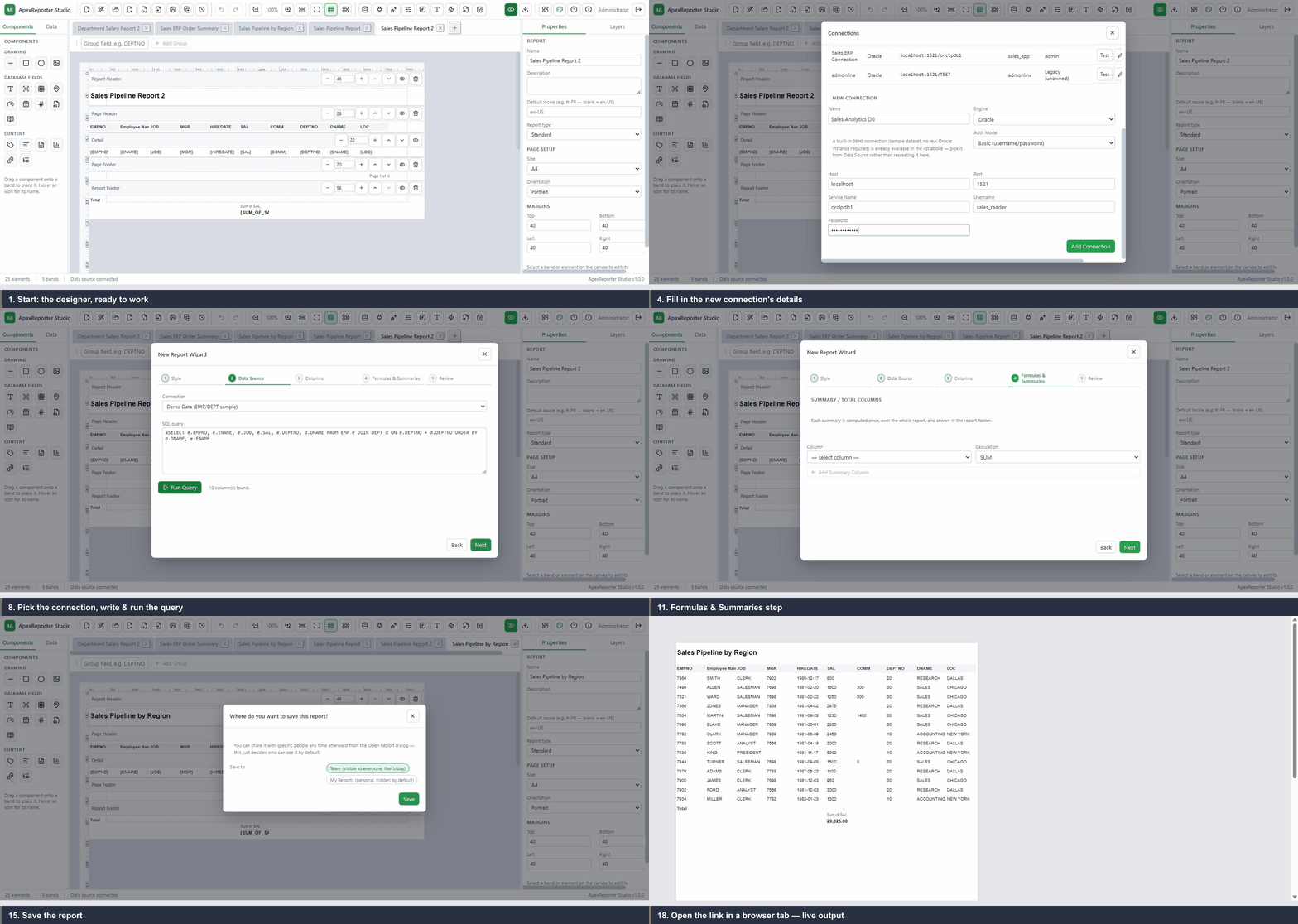
Connection to live API, start to finish
18 labeled steps: create a connection, run the Report Wizard (type, query, columns, summaries), save, preview, then open the report's own API link and view live output.
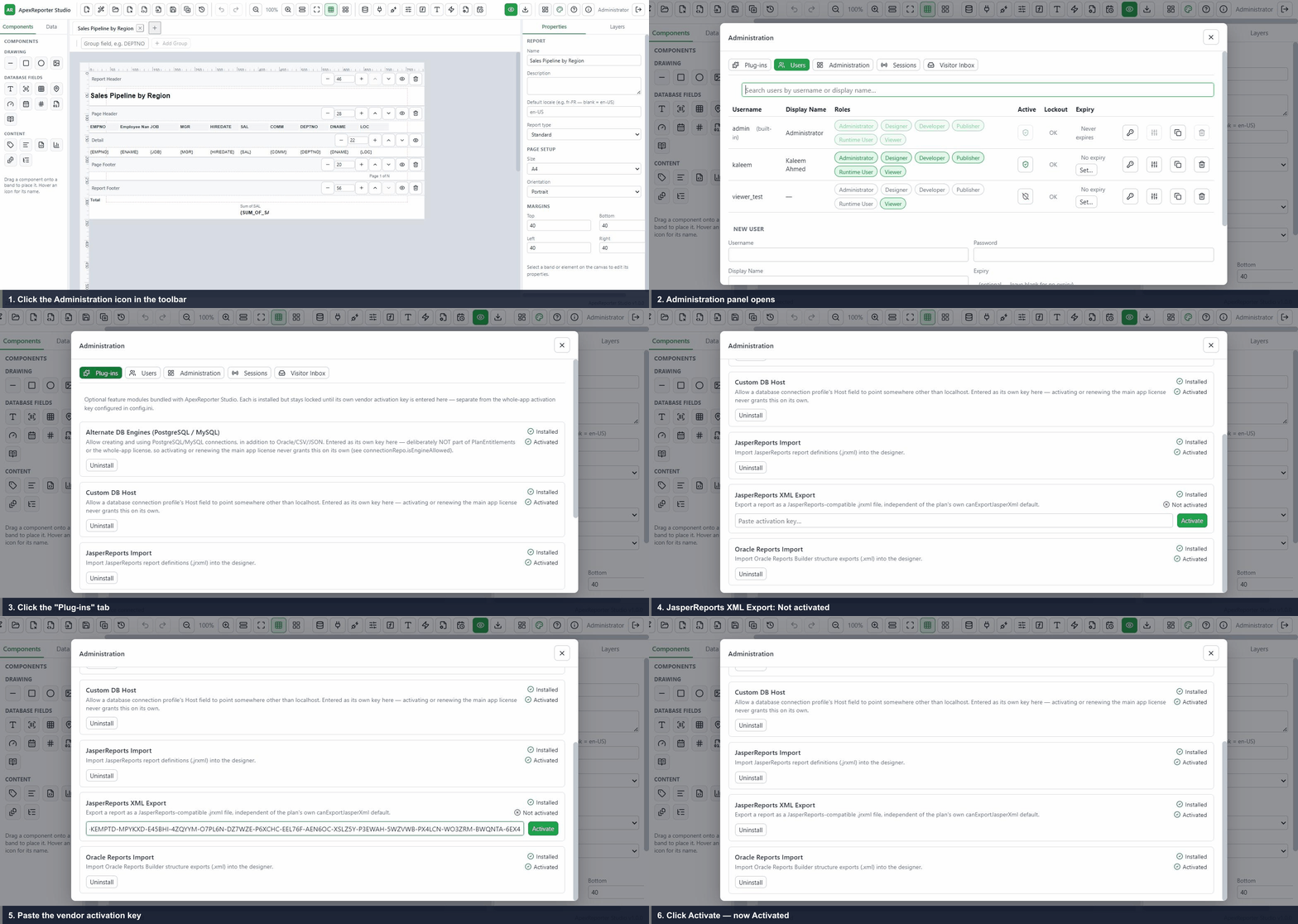
Activate plug-ins with a key
Turn on optional modules like Alternate DB Engines from the Plug-ins panel with their own standalone key.
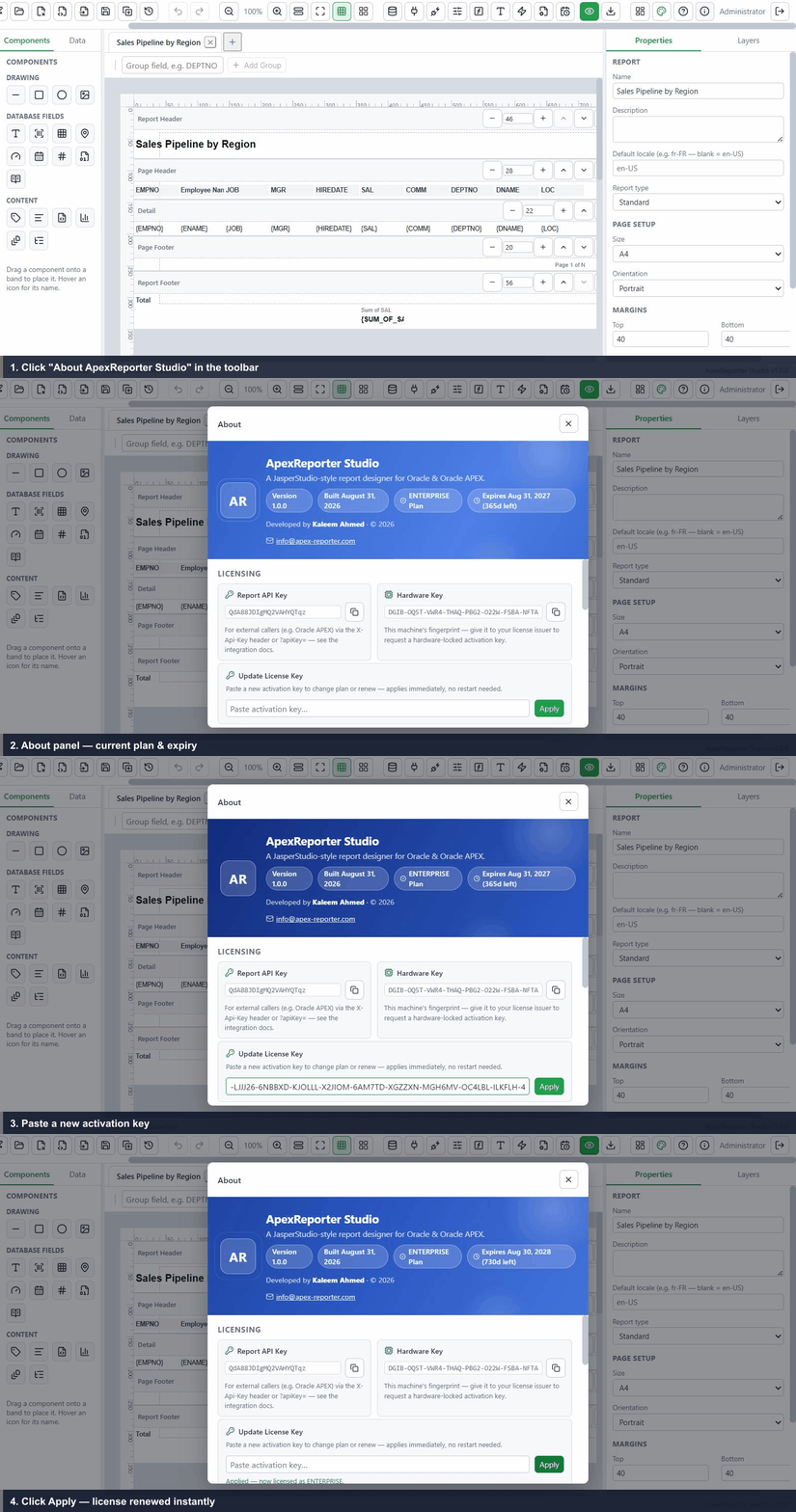
Renew your product license
Paste a new activation key into the About panel to change plan or renew — applied instantly, no restart.
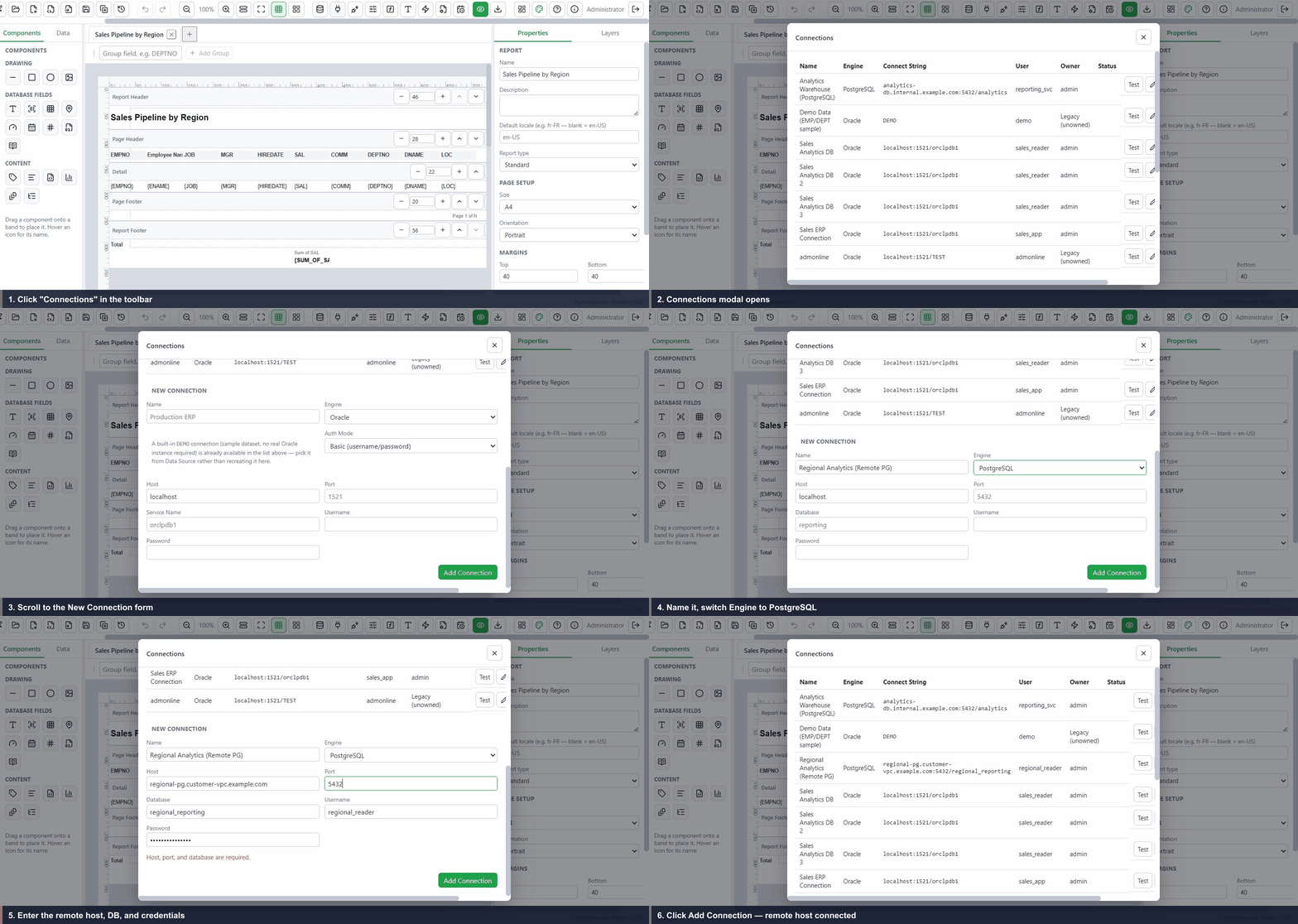
Connect to a custom DB host
With Alternate DB Engines and Custom DB Host activated, add a PostgreSQL connection at any host you choose.
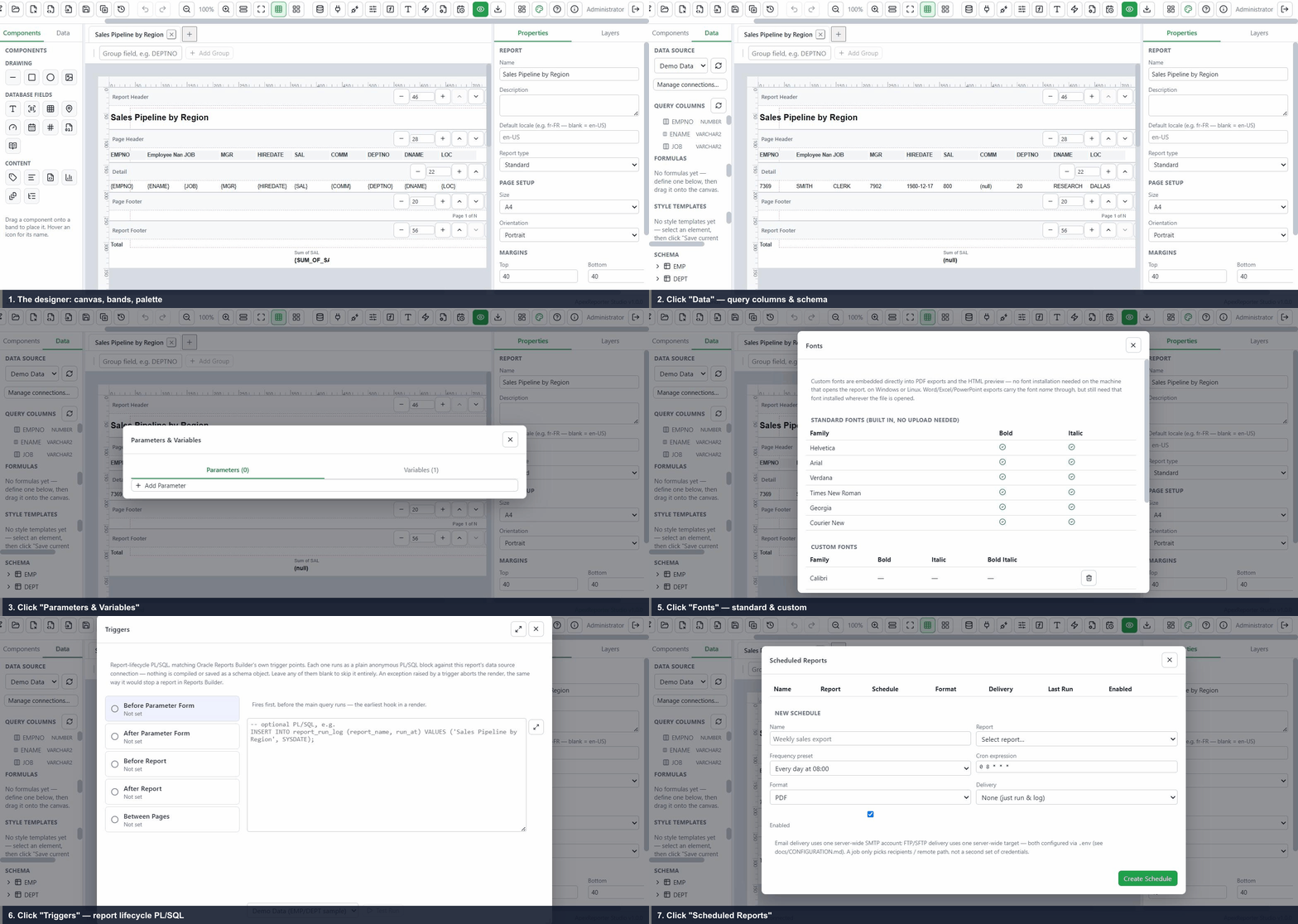
A tour of the toolbar
Data Source, Connections, Parameters, Program Units, Fonts, Triggers, Scheduling, and every other panel.
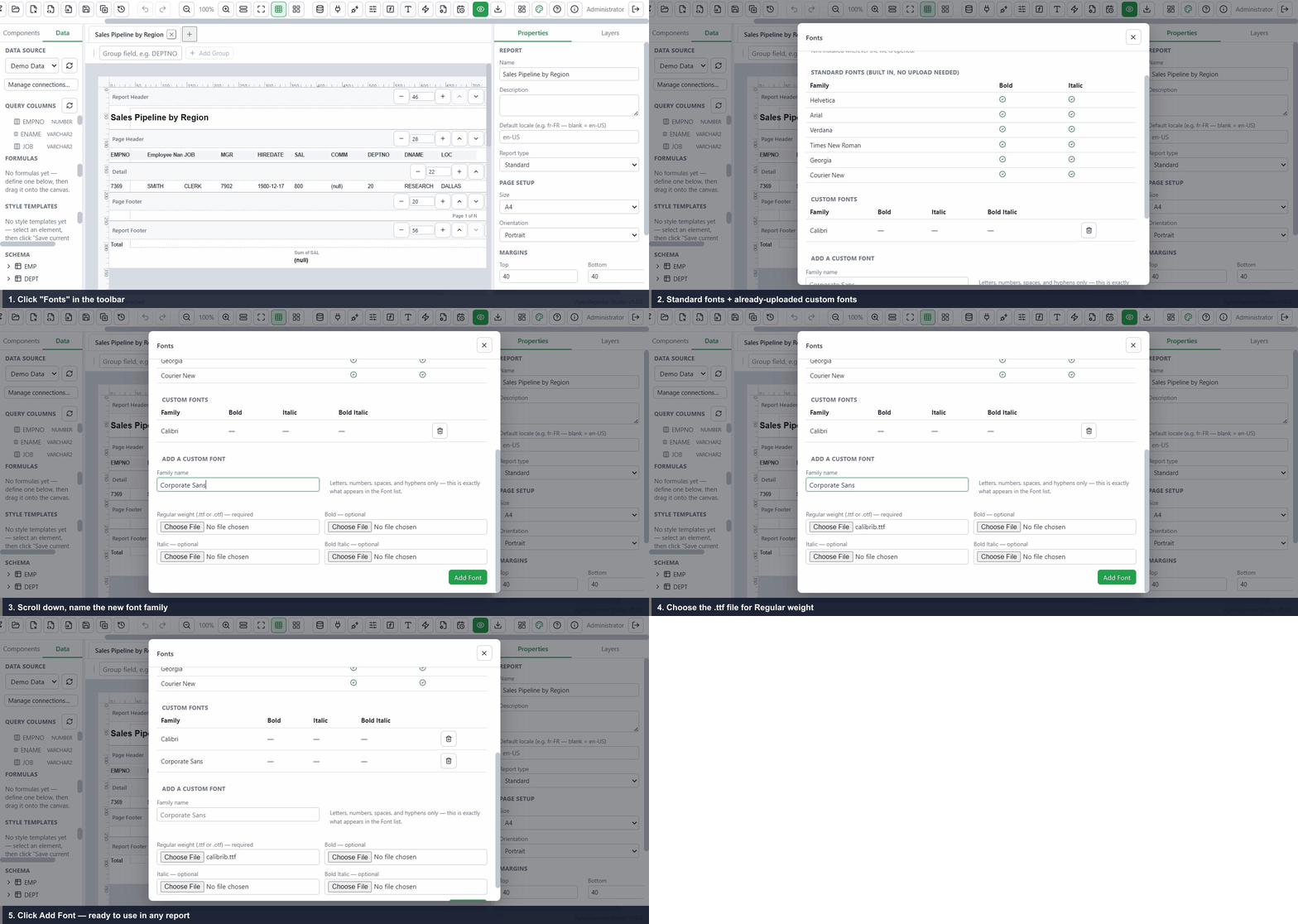
Add a custom font
Upload a font once and reuse it across every report — embedded directly into PDF and HTML output.
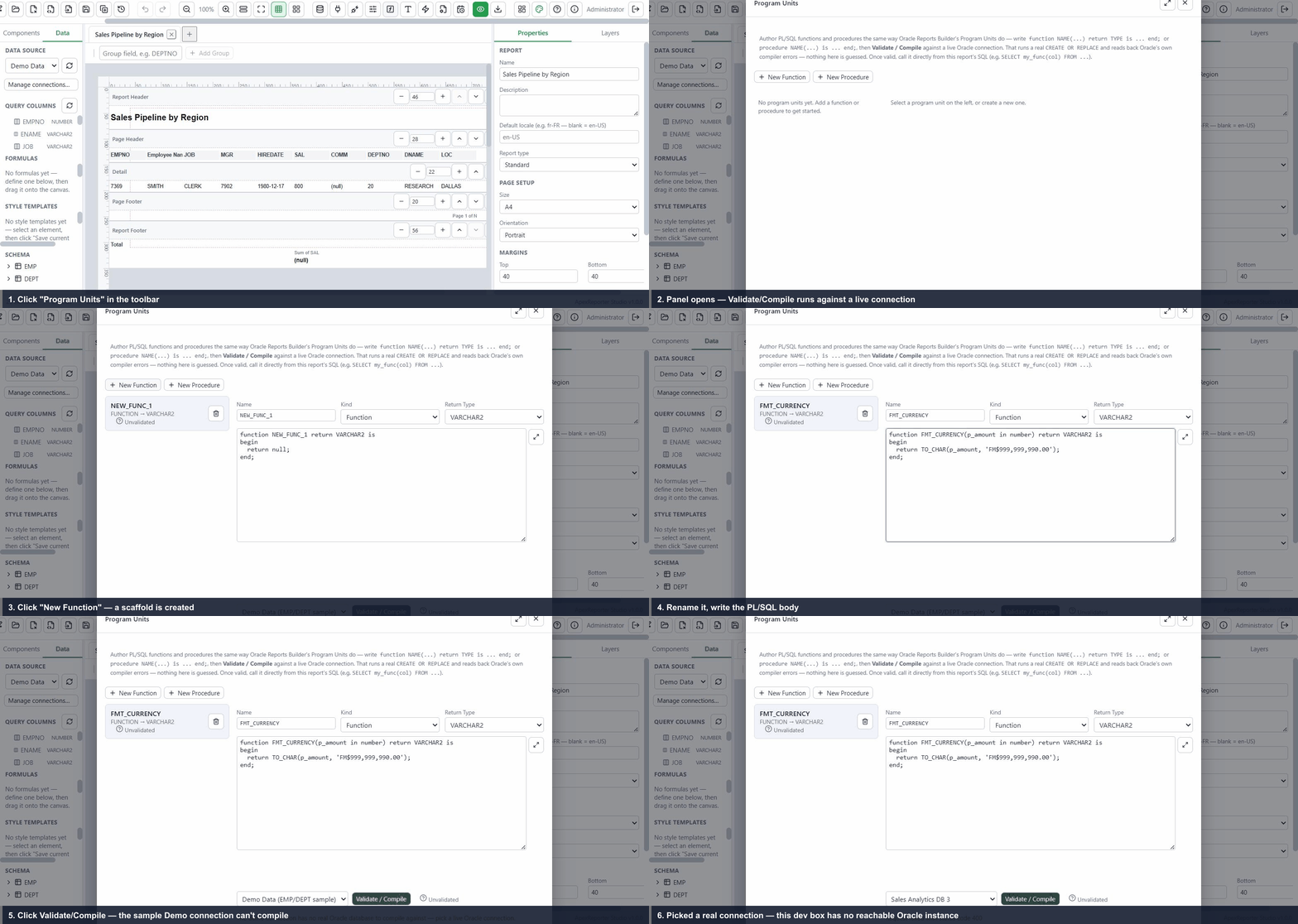
Write & compile a program unit
Author a PL/SQL function or procedure and validate/compile it against a live Oracle connection.
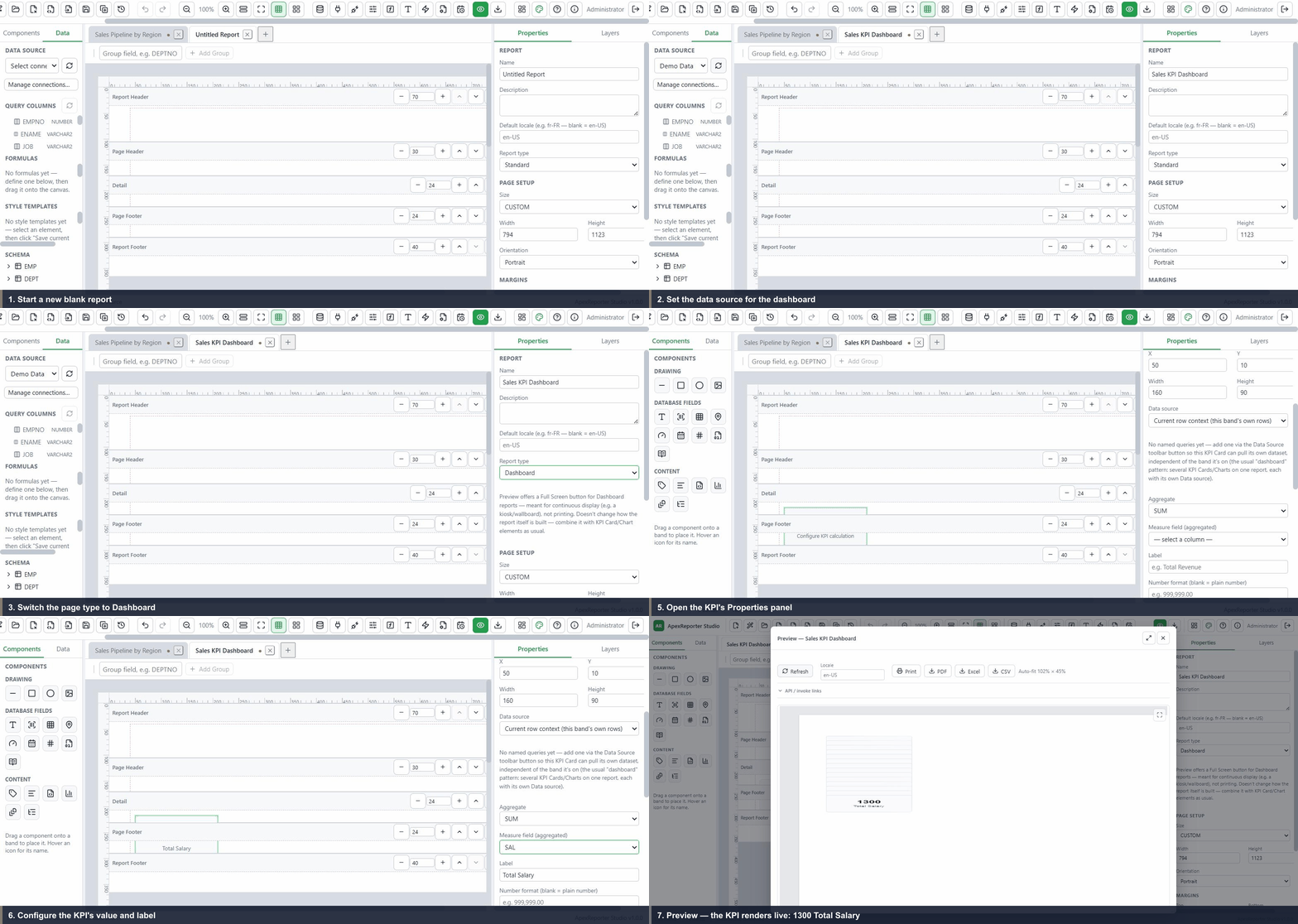
Create a dashboard report
Switch a report to Dashboard type and add a KPI Card for a continuously-displayed wallboard view.
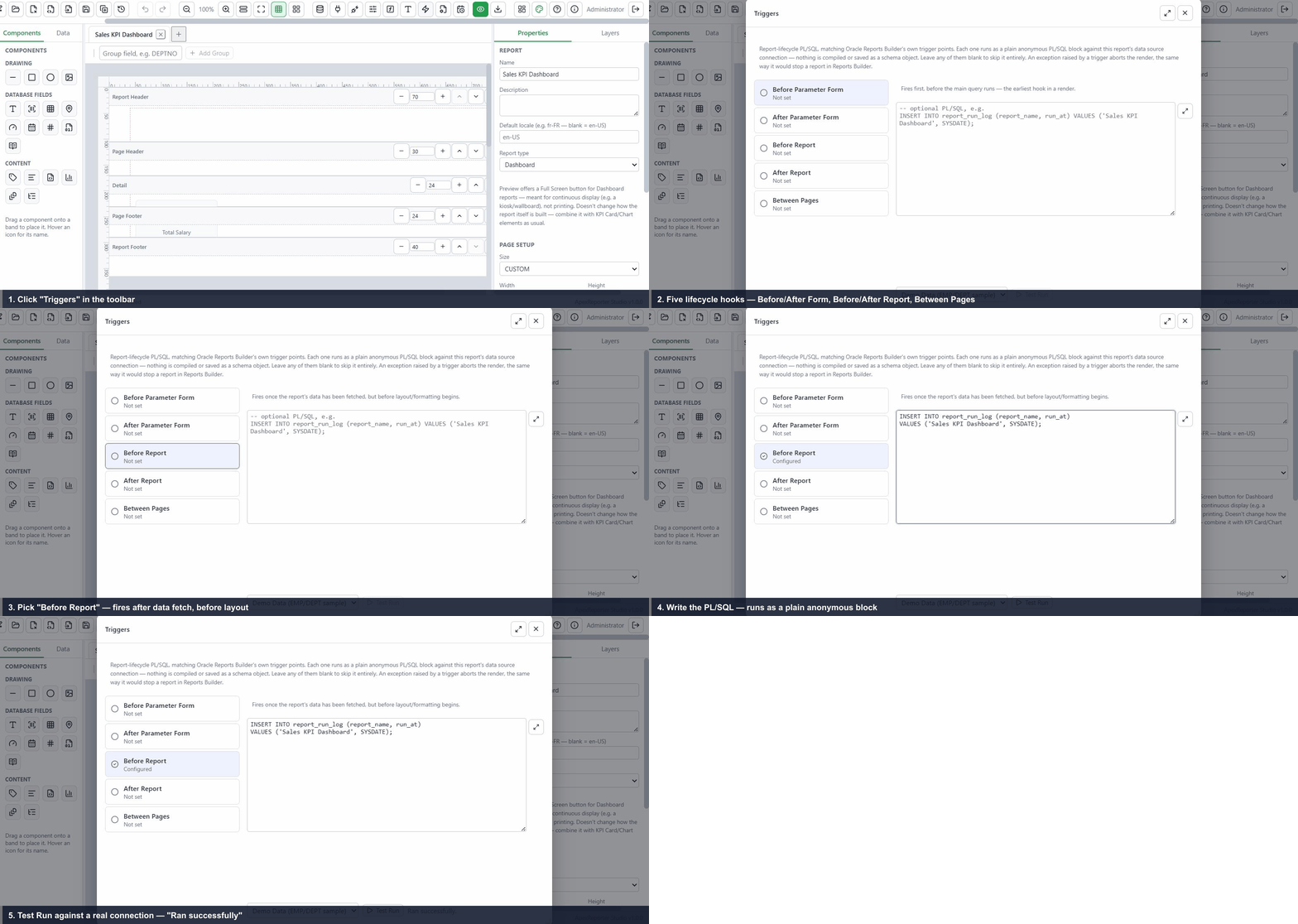
Add a report trigger
Write a Before Report PL/SQL trigger and test it against a live connection before it runs on every render.
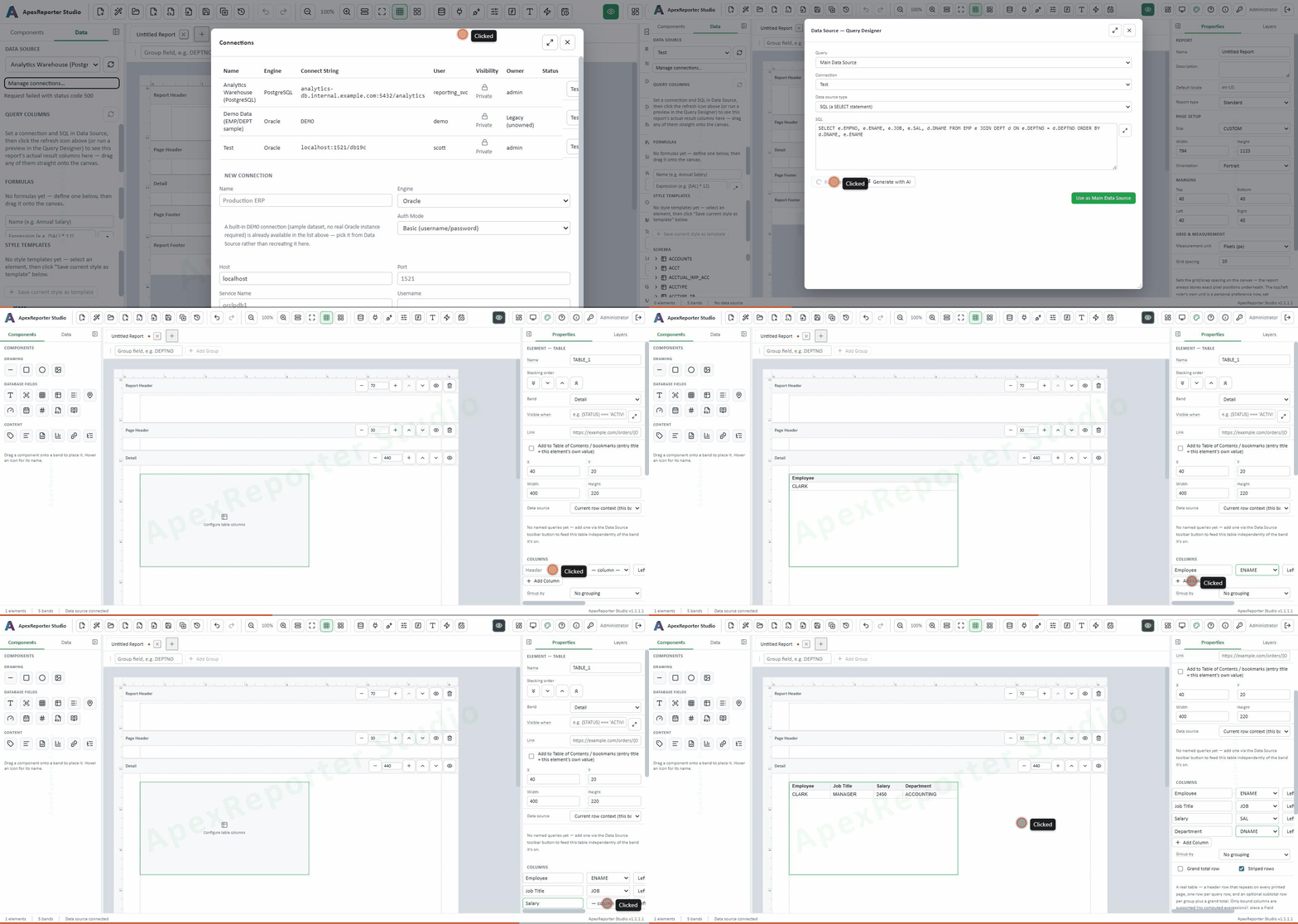
Build a report with a Tablix
Drag the Table element onto a band, bind its columns to a live query, and see real rows render on the canvas.
One designer. Three plans that grow with your team.
Every user — designer, viewer, or admin — counts toward your plan's user limit. Each license activates on a single machine or server. Try the live demo anytime, no credit card required.
Basic
For individuals standardizing core Oracle reporting.
- Report creation: Tabular, Group Above, Group Left
- Single database connection
- Single user (administrator)
- PL/SQL functions & procedures
- Local installation & configuration
- Up to 30 reports
- Multiple users, version history
Pro
For teams standardizing day-to-day Oracle reporting.
- Report creation: Tabular, Group Above, Group Left
- Multiple database connections
- Up to 5 users
- Version history, PL/SQL functions, procedures & triggers
- Report page setup (custom paper sizes)
- Report import / export
- Up to 100 reports
- Report scheduler, custom fonts, unlimited users, reports sharing
Enterprise
For teams standardizing enterprise-wide Oracle reporting.
- Everything in Pro, plus:
- Report scheduler with email/FTP delivery
- Custom font uploads
- Multi-user setup — unlimited users
- Personal report folders
- Report Sharing
- Export / import all reports at once
- No report limit
Custom
For multi-site or volume deployments.
- Everything in Enterprise, plus:
- Multi-machine / site-wide licensing, quoted as one agreement
- Priority migration support for large Oracle Reports/JasperReports estates
- All migration & connectivity add-ons bundled, not billed separately
- Dedicated onboarding call and a named contact
One-time migration add-ons
Optional plugins, licensed once per installation — independent of your plan and never expiring.
Oracle Reports Migrator
Import Oracle Reports Builder 12c XML structure exports directly into the designer as a starting report — SQL, groups, layout, and PL/SQL, with anything ambiguous flagged for manual review.
See how it works →Jasper Reports Migrator
Import JasperReports (.jrxml) definitions built in Jaspersoft Studio directly into the designer — fields, groups, SQL, and layout converted automatically.
See how it works →JasperReports XML Export
Export any report built in the designer back out as a JasperReports-compatible .jrxml file, for teams standardizing on Jaspersoft Studio downstream.
See how it works →Custom DB Host
Point a database connection at a host other than localhost — for installations where the Studio server and the target database live on different machines. Off by default on every plan; enabled only by this key.
See how it works →Alternate DB Engines
Connect to PostgreSQL or MySQL in addition to Oracle. Deliberately not bundled into any plan (including Enterprise) — Oracle, CSV, and JSON stay the always-available baseline; this key is what actually turns the other two engines on.
See how it works →Compare plans feature-by-feature
Everything each plan includes, side by side.
| Feature | Trial | Basic | Pro | Enterprise | Custom |
|---|---|---|---|---|---|
| Report creation | |||||
| Tabular | ✓ | ✓ | ✓ | ✓ | ✓ |
| Group Above | ✓ | ✓ | ✓ | ✓ | ✓ |
| Group Left | ✓ | ✓ | ✓ | ✓ | ✓ |
| Summary Only | ✓ | ✓ | ✓ | ✓ | ✓ |
| Master-Detail | ✓ | ✓ | ✓ | ✓ | ✓ |
| Form / Single Record | ✓ | ✓ | ✓ | ✓ | ✓ |
| Matrix / Cross-Tab | ✓ | ✓ | ✓ | ✓ | ✓ |
| Mailing Labels | ✓ | ✓ | ✓ | ✓ | ✓ |
| Multi-Column (Newspaper) | ✓ | ✓ | ✓ | ✓ | ✓ |
| Statement / Ledger | ✓ | ✓ | ✓ | ✓ | ✓ |
| Crosstab element | ✓ | ✓ | ✓ | ✓ | ✓ |
| Links & drill-through | ✓ | ✓ | ✓ | ✓ | ✓ |
| Table (tablix) | ✓ | ✓ | ✓ | ✓ | ✓ |
| Growing / page-splitting bands | ✓ | ✓ | ✓ | ✓ | ✓ |
| Bookmarks & Table of Contents | ✓ | ✓ | ✓ | ✓ | ✓ |
| 16 native chart types | ✓ | ✓ | ✓ | ✓ | ✓ |
| Dashboard report type (KPI Card, auto-refresh) | — | — | — | ✓ | ✓ |
| Capacity | |||||
| Licensed installation | Hosted demo, or local (no key) | 1 machine | 1 machine | 1 machine | Multi-machine / site-wide |
| Database connections | Single | Single | Multiple | Multiple | Multiple |
| Users | 1 (admin) | 1 (admin) | Up to 5 | Unlimited | Unlimited |
| Variables | 2 | Unlimited | Unlimited | Unlimited | Unlimited |
| Parameters | 2 | Unlimited | Unlimited | Unlimited | Unlimited |
| Reports | Up to 5 | Up to 30 | Up to 100 | Unlimited | Unlimited |
| Authoring & operations | |||||
| Local installation & configuration | ✓ | ✓ | ✓ | ✓ | ✓ |
| Version history | — | — | ✓ | ✓ | ✓ |
| PL/SQL functions & procedures | — | ✓ | ✓ | ✓ | ✓ |
| Triggers | — | — | ✓ | ✓ | ✓ |
| Report page setup | — | — | ✓ | ✓ | ✓ |
| AI-assisted SQL & expression generation | ✓ | ✓ | ✓ | ✓ | ✓ |
| Report import / export | — | — | ✓ | ✓ | ✓ |
| Export / import all reports at once | — | — | — | ✓ | ✓ |
| Report scheduler (cron, Email/FTP/SFTP delivery) | — | — | — | ✓ | ✓ |
| Custom fonts | — | — | — | ✓ | ✓ |
| Personal folders & report sharing | — | — | — | ✓ | ✓ |
| Platform, API & integration | |||||
| Oracle APEX integration (JS client + REST) | ✓ | ✓ | ✓ | ✓ | ✓ |
| Thin-mode Oracle connectivity (no Instant Client) | ✓ | ✓ | ✓ | ✓ | ✓ |
| Role-based access control & audit trail | ✓ | ✓ | ✓ | ✓ | ✓ |
| Migration & connectivity add-ons (licensed once, independent of plan) | |||||
| Oracle Reports Migrator (.rdf structure XML) | — | Add-on | Add-on | Add-on | Bundled |
| JasperReports Migrator (.jrxml import) | — | Add-on | Add-on | Add-on | Bundled |
| JasperReports XML export | — | Add-on | Add-on | Add-on | Bundled |
| Custom DB Host (non-localhost connections) | — | Add-on | Add-on | Add-on | Bundled |
| Alternate DB Engines (PostgreSQL / MySQL) | — | Add-on | Add-on | Add-on | Bundled |
Built by people who've lived Oracle Forms and Reports migrations
ApexReporter Studio exists because too many Oracle shops were stuck choosing between an aging Oracle Reports/Forms stack and a costly rip-and-replace onto a reporting tool that doesn't understand Oracle PL/SQL, bind variables, or thin-mode connectivity. We build the tool we wished existed: a modern, visual designer that speaks Oracle natively and runs entirely on infrastructure you control.
Oracle-first, not Oracle-adjacent
Every feature is designed and verified against real Oracle Database connections — thin-mode connectivity, bind variables, PL/SQL functions, procedures, and triggers — not retrofitted from a generic reporting engine.
Your data stays on your network
ApexReporter Studio installs on your own Windows or Linux server. There's no hosted multi-tenant backend holding your connection strings or query results — self-hosted is the only mode there is.
Migration-aware by design
The Oracle Reports and JasperReports migration plug-ins exist because we know most teams adopting ApexReporter Studio aren't starting from a blank page — they're carrying years of existing report definitions forward.
Talk to us before you buy
Questions about a plan, a migration from Oracle Reports or JasperReports, or deploying on your own infrastructure — reach out and a real person will get back to you.
Email sales
For pricing, licensing, and plan questions.
Frequently asked questions
Can I try ApexReporter Studio before buying a plan?
Yes — a live hosted demo is available anytime at apex-reporter.com/studio, no install and no signup required. When you're ready for your own connections, users, and schedules, install it on your own server under a Basic, Pro, or Enterprise plan.
What's the difference between the live demo and the downloadable trial?
The live demo at apex-reporter.com/studio runs on our servers against sample data — nothing to install, but not connected to your own Oracle instance. The downloadable trial installs on your own Windows or Linux server, no license key required, and connects to your real Oracle database (1 connection). It's capped at 5 reports and 1 Oracle Reports + 1 JasperReports import, and every export carries a permanent "Trial Usage Only" watermark — enough to fully evaluate the product against your own data before buying.
Is this a cloud service or does it run on our own servers?
ApexReporter Studio is self-hosted — it installs on your own Windows or Linux server and connects directly to your Oracle instance. Your report data and query results never leave your network.
Do we need to install Oracle Instant Client?
No. Standard username/password and EZConnect/TNS connections run in thin mode out of the box — no separate Oracle Client installation.
Can we migrate existing Oracle Reports (.rdf) or JasperReports (.jrxml) definitions?
Yes, via the optional Oracle Reports Migrator and Jasper Reports Migrator add-ons (see Extra options above) — each reads a report definition export (SQL, groups, layout, and PL/SQL/expressions) and converts it into a starting ApexReporter report, flagging anything that needs manual review. See the Documentation's Plug-ins section for the full walkthrough.
What counts toward a plan's user limit?
Every account on the installation — designers, viewers, and administrators alike. Trial and Basic are both single-user (the built-in admin account only), Pro supports up to 5 users, and Enterprise is unlimited.
Is a plan licensed per user, or per machine?
Per machine. Each Basic, Pro, or Enterprise activation key licenses one installation — one physical or virtual server — regardless of how many users are on it, up to that plan's user limit. Running the same key on a second machine isn't supported; a key can optionally be hardware-locked to that one machine's fingerprint.
What's included in the live demo?
All ten report styles (Tabular, Group Above, Group Left, Summary Only, Master-Detail, Form, Matrix, Mailing Labels, Multi-Column, Statement / Ledger) plus the Crosstab element, a single database connection, a single (admin) user, 2 variables, 2 parameters, and up to 5 reports — enough to fully evaluate the designer itself. Version history, scheduling, custom fonts, and multi-user access unlock on Basic, Pro, or Enterprise.
Can we call reports from Oracle APEX?
Yes — a documented REST surface, a JavaScript client, and a trusted API-key path are all built in specifically for invoking and embedding reports from an Oracle APEX page, on every plan. See the Oracle APEX reporting guide for setup steps and examples.
Replace your legacy Oracle reporting stack this quarter
Start designing against your own Oracle instance — or the built-in demo dataset — in minutes.